
At the beginning of this summer, I gave myself a fairly ambitious objective. I wanted to figure out how far I could realistically take AI inside my own company.
Like a lot of business owners, I had already been using ChatGPT for a while. I used it to research questions, work through ideas, write emails, analyze problems and help with content. It was useful, but I was starting to realize that this was probably the very bottom end of what AI could actually do inside a business.
If I had to rate myself at that point, I was probably at Level 2 or 3 out of 10.
So I started asking a different question.
What does Level 10 actually look like?
I still don’t think I am there. I am probably somewhere around Level 8 or 9 today. But over the last several months, the way I use AI has changed dramatically. More importantly, my understanding of what “implementing AI” actually means has changed.
It turns out there is a very big difference between using AI and building a business that uses AI as part of how work gets done.
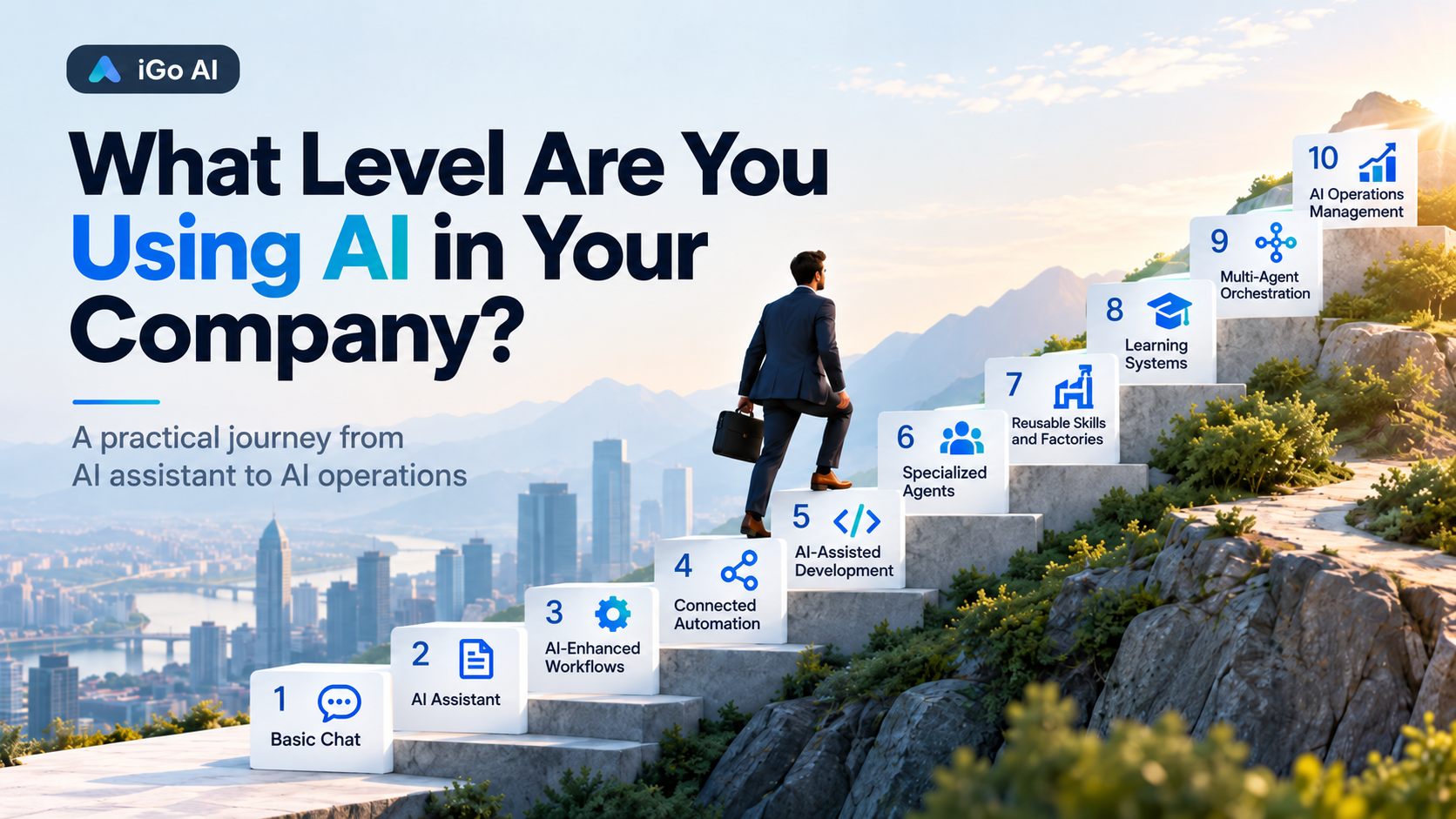
My 10 Levels of Business AI
This isn’t an industry standard. It is simply the scale I have developed based on my own experience.
| Level | What AI looks like in the business |
|---|---|
| 1. Basic Chat | Ask questions, summarize information, generate an occasional email or piece of content. |
| 2. AI Assistant | Use AI regularly for writing, research, analysis, brainstorming and problem solving. |
| 3. AI-Enhanced Workflows | AI becomes part of repeatable work such as reports, CRM enrichment, research, document processing or content production. |
| 4. Connected Automation | AI is connected to other systems through tools such as n8n, APIs, CRM platforms and databases so information can move without constant copying and pasting. |
| 5. AI-Assisted Development | AI starts building the tools themselves: code, plugins, integrations, automation scripts, interfaces and internal applications. |
| 6. Specialized Agents | Instead of one general AI, create specialized systems with defined jobs, instructions, context and boundaries. |
| 7. Reusable Skills and Factories | Package your expertise and processes into reusable skills and structured workflows that can repeatedly produce a business outcome. |
| 8. Learning Systems | Feed results and human feedback back into the system so future decisions are influenced by what actually happened. |
| 9. Multi-Agent Orchestration | Multiple specialized AI roles share context, hand work between each other, validate each other’s work and complete larger processes with humans mainly supervising exceptions and approvals. |
| 10. AI Operations Management | An AI coordination layer understands objectives, delegates work across agents and systems, monitors outcomes and continuously manages workflows across the organization within defined human controls. |
The important thing I have learned is that moving up these levels isn’t really about becoming better at prompting ChatGPT. I’m actually glad the “prompt engineering” moniker is more or less dead!
Each level requires a different way of thinking about the business and a somewhat more complex way of organizing AI around your work.
It Started With Automation
My first serious step beyond ChatGPT chat was n8n.
I already had a background in CRM, marketing automation, systems integration and APIs, so this was a natural starting point. I began using n8n to connect AI to real business processes rather than just asking AI questions.
Some of the early work involved CRM enrichment and processing information before putting it into the CRM. Instead of someone manually looking up information, reorganizing it and entering it into fields, AI could perform some of that interpretation and an automated workflow could move the information where it belonged.
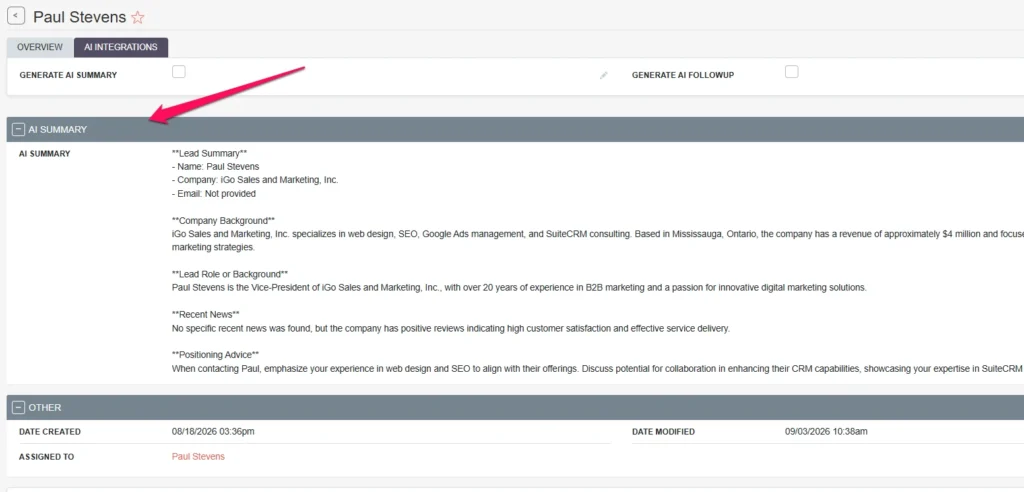
That sounds fairly straightforward now, but it was an important change in thinking.
The AI was no longer a place to ask questions and then copy and paste the answer into another piece of software.
It was one component in a process. That is a key distinction.
A useful business workflow might look more like:
Something happens → data is collected → AI interprets it → business rules are applied → another system is updated → a human reviews an exception.
Once I understood that pattern, I started seeing possible AI applications everywhere. I even created a 3PL POD processing workflow that uses AI to read proof-of-delivery documents, match them to shipments and ready the orders for invoicing.
AI Became an Analyst
Another early use was monthly reporting for a transportation client.
Previously, creating a useful marketing report involved gathering numbers from different systems, comparing periods, identifying what changed and then trying to explain what it actually meant.
The interesting part isn’t producing charts. Software has been producing charts for decades.
The interesting part is interpretation. It has really helped me do better analysis for this client and zero in on improvements.
Were website leads actually prospective customers, or were some job applicants? Did traffic increase because marketing improved, or because something unrelated happened? Did rankings improve for commercially valuable searches or just informational ones? Was there evidence that marketing activity was creating genuine sales opportunities?
AI became very good at helping me work through those questions with the right data.
The result wasn’t simply faster report writing. The reporting process became more analytical.
That was probably when I moved firmly into Level 3. AI was becoming part of a recurring business process. Plus, it wasn’t replacing me. It was making me better at what I do by giving me better information and allowing me to spend more of my time doing what I do best: strategy.
Then AI Started Building the Tools
The next major jump came when I started using Codex extensively.
I have developed and managed websites for years, but I am not someone who wants to spend my day hand-coding software. With Codex, that barrier changed significantly.
I began using AI to build WordPress functionality, plugins, CRM modifications, integrations and internal tools. I also started becoming much more disciplined about version control, repositories and project documentation using Gitea (my own local Git).
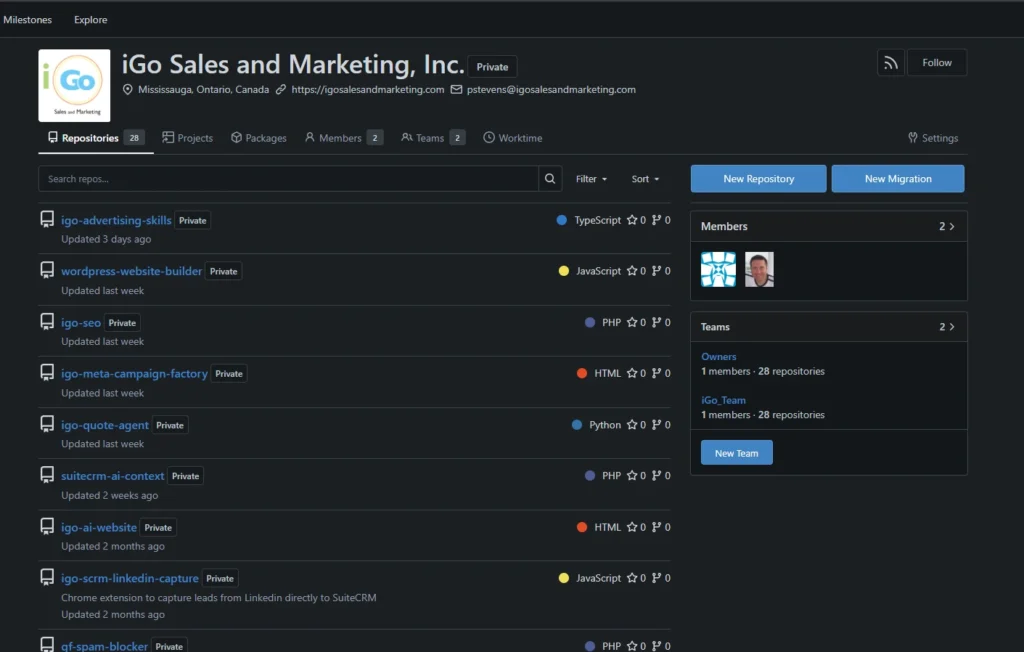
That changed my role again.
Instead of telling AI:
“Write this PHP function.”
I increasingly found myself saying:
“Here is the business requirement. Here is how the existing system works. Here are the constraints. Develop an implementation plan, make the changes, test them and document what you did.”
That is a very different relationship with AI.
AI wasn’t simply giving me code anymore. I was managing an AI developer.
I started keeping project instructions in repositories, documenting decisions and establishing rules that Codex could follow consistently. Once that context existed, I didn’t have to explain the entire project again every time I wanted something changed.
That was my introduction to persistent AI context. This is a key learning step. Once you understand that your instructions can, and should, persist, your work with AI multiplies exponentially and the quality follows. You actually start building repeatable systems where AI produces what you want it to produce on a consistent basis.
It also taught me something important about AI implementation.
The quality of the system’s context is often more important than the cleverness of the prompt.
No more “prompt engineering”!
An Agent Is Really Just a Computer Program Written in English
Somewhere around this point, I had another realization that made the whole concept of AI agents much less mysterious to me.
An agent is really just a computer program written in English.
That may be oversimplifying it technically, but it became a very useful mental model.
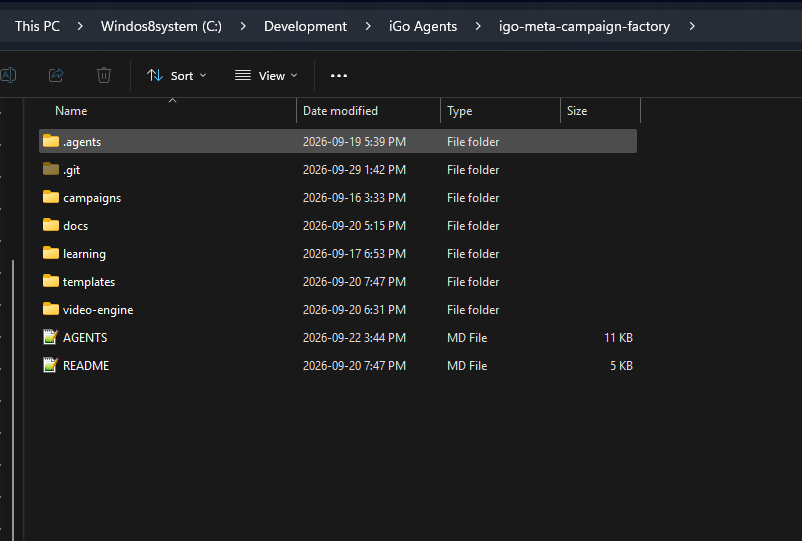
In a conventional computer program, you have a main program that contains instructions and logic. That program calls functions or subroutines when it needs them.
I started looking at my AI projects the same way.
The AGENTS.md file became, in my mind, the equivalent of the main executable. It defines what the agent is supposed to do, the rules it operates under, the process it follows and which specialized capabilities it should call when it needs them.
The SKILL.md files are essentially the subroutines.
Need to apply advertising principles? Call the advertising skill.
Need to evaluate a landing page? Call the CRO skill.
Need to create a social visual? Call the design skill.
Need client-specific information? Pull in the client knowledge.
Once I saw agents this way, building and structuring them became much easier.
It stopped feeling like some mysterious new branch of artificial intelligence and started feeling surprisingly familiar.
It was a lot like building a WordPress plugin.
You have a main program. You break responsibilities into reusable functions. You define when those functions should execute. You pass the right information between them. You make sure each part has a clearly defined job.
The biggest difference is that instead of writing all of the logic in PHP, I am increasingly writing the program in English.
That realization was probably one of the biggest breakthroughs in my AI journey because it allowed me to stop thinking about “prompts” and start thinking about software architecture.
From Agents to Factories
The next stage was building specialized AI systems.
One of the best examples is a Facebook Campaign Factory I built for iGo.
Originally, I could have simply asked ChatGPT:
“Write me three Facebook ads.”
That would be Level 1 or 2 AI.
Instead, I built a structured system that understands the campaign objective, target audience, offer, positioning, landing page, advertising principles and creative requirements.
I added specialized advertising knowledge and conversion principles as reusable skills. The system develops the strategy before it develops the ads. It looks at continuity between the audience, advertisement, offer and landing page instead of treating an ad as an isolated piece of copy.
It also records the assumptions behind the campaign.
Then something more important happens.
Once the campaign runs, I feed the results back into the system.
The factory can compare the result against the original hypothesis, determine what appears to have worked or failed and use those findings when planning the next iteration.
At that point, I wasn’t just using an agent anymore. I had built a learning loop.
The system could make a decision, observe the outcome and change future recommendations based on evidence. It could update its own rules and knowledge to get better the next time around.
This is incredibly powerful.
That moved me into Levels 7 and 8.
Then I Built an AI That Learned a Client’s Taste
One of the more interesting experiments happened during a website design project.
Website design is difficult to automate because much of it is subjective. A technically correct website can still be completely wrong for the client. This has always been a point of frustration for me. I build a beautiful, technically excellent website and then the client doesn’t like a particular shade of blue!
So instead of building a generic “website designer,” I built a design system around one client’s preferences.
Internally, I called the design agent Virtual Wendy.
You can read more about my Virtual Wendy Design Agent Project here.
The system didn’t just know the website requirements. It contained information about the client’s aesthetic preferences, typography, colour direction, layout preferences, business philosophy and previous design decisions.
I also added multiple design and usability skills that the system could draw on.
But the most interesting part was what happened after the first concepts were produced.
The client gave feedback.
Instead of treating that feedback only as a list of revisions, I also asked whether it revealed something new about her taste.
If it did, that preference became part of Virtual Wendy and the persistent knowledge the agent could use for future revisions and new page designs.
The next design wasn’t starting from the original brief again. It was starting from everything the system had learned from the project so far.
That was another feedback loop:
Design → client reaction → learning → updated client model → better next design.
That experience changed my thinking considerably.
AI knowledge does not have to be static, and it’s better when it’s not.
The client herself can progressively train the system simply by doing what clients normally do: reviewing work and providing feedback.
This project dramatically changed my thinking.
I realized I was no longer just in the website design business. I was in the website design agent-building business.
Separating Client Knowledge From the Skill
More recently, I have been experimenting with another architectural change.
I built a social media system for a local service business. Instead of putting everything into one giant AI prompt or agent, I separated the responsibilities.
One component understands the client.
It knows the business, services, audience, brand, positioning, previous decisions and relevant client-specific information.
Another component knows how to do the job.
It understands how to create the social media post, how the copy and visual should work together, and how to apply copywriting and design skills to produce an effective Facebook post within a defined production workflow.
That creates a structure more like this:
Client knowledge + specialized skill + specific objective = output
This is a small distinction technically, but an important one architecturally.
The same social media skill can potentially work for another client without bringing the first client’s knowledge with it.
The client knowledge can also potentially be used by another agent without rebuilding the entire understanding of the company.
I realized I was creating create a collection of reusable AI capabilities rather than a collection of giant prompts.
Another nail in the coffin for “prompt engineering”!
The Next Step Is Multiple Agents Working Together
This is where I am now.
In many of my current systems, I still act as the traffic controller.
A client sends me feedback. I give that feedback to ChatGPT. ChatGPT helps me interpret it and turn it into instructions. I give those instructions to Codex. Codex updates the work and, where appropriate, updates the client’s persistent knowledge.
It works very well.
But I’m still standing in the middle.
The obvious next experiment is to remove some of that routing.
Instead of me translating the client’s raw feedback, an intake agent could do it. All I have to do is give it an inbox.
Its job would be to distinguish between:
- an explicit requested change,
- a new confirmed preference,
- a tentative preference,
- a question,
- an inconsistency,
- and something requiring human judgment.
A knowledge agent could then determine what should become persistent client knowledge.
A specialist agent could plan the actual work.
Codex could implement it.
A separate QA agent could review the finished work against both the client’s request and the established project requirements.
Only then would it come back to me for approval.
That is Level 9.
The shift is from:
AI helps me perform each task
to:
AI carries the work through a controlled process and brings me the decisions or exceptions that need me.
Level 10 Is Not “Turn the Humans Off”
I don’t think Level 10 means allowing a collection of AI agents to roam around a company making unrestricted decisions.
That sounds impressive in a demonstration. It also sounds like a good way to create a disaster.
My idea of Level 10 is more practical.
Imagine an AI operations manager sitting above a collection of specialized agents.
It understands that the business has objectives. It knows which systems and agents are available. It knows their responsibilities and their limits.
A request enters the organization and the operations layer determines what needs to happen.
It may assign research to one agent, analysis to another, production to a specialist, implementation to a coding agent and validation to another system.
It monitors the state of the work.
It knows when human approval is required.
It records what happened.
It learns from outcomes and updates its instructions.
More importantly, it escalates uncertainty to a human reviewer instead of pretending certainty.
Humans still determine goals, strategy, risk tolerance and important business decisions.
The difference is that humans are managing the operation instead of manually moving information between every step in the operation.
I’m not there yet.
But I can see the architecture now.
At the beginning of the summer, I couldn’t.
The Hardest Part Hasn’t Been the AI
One of the biggest lessons from this journey is that implementing AI is rarely primarily an AI problem.
The difficult questions are usually things like:
- What exactly is the process?
- Where does reliable information come from?
- What should be remembered?
- What should not be remembered?
- Which decisions can the system make?
- Which decisions require human approval?
- How do we know whether the output was correct?
- What happens when two pieces of information conflict?
- How do we prevent a guess from slowly turning into an organizational “fact”?
- How do different agents share knowledge without becoming one giant mess?
Those are business process and systems design questions.
The AI is often the easy part.
My background managing business operations, CRM implementations, websites, marketing systems and logistics has probably been more valuable in this process than knowing the latest AI terminology.
I increasingly believe the best AI implementations will come from people who understand the process first and the technology second.
Don’t Start at Level 10
There is another lesson here.
I would not recommend that a company read this article and immediately decide it needs a fleet of autonomous AI agents.
Start with an actual business problem.
Find something repetitive, expensive, slow, inconsistent or dependent on knowledge that currently lives in someone’s head.
Map the process.
Then ask whether AI genuinely improves it.
My own progression has essentially been:
Observe → assist → automate → specialize → connect → learn → orchestrate.
Each stage taught me something I needed for the next one.
Had I started the summer by trying to build an “AI operations manager,” I probably would have built a complicated system looking for a problem.
Instead, every step came from solving something I actually needed.
So, What Level Are You?
This is the question I’ve started asking when people tell me their company is “using AI.”
That could mean an employee occasionally asks ChatGPT to rewrite an email.
It could mean AI is connected to the CRM and processing information.
It could mean the company has specialized agents using common organizational knowledge.
Or it could mean entire workflows are being coordinated by AI with humans supervising decisions and exceptions.
Those are completely different levels of implementation.
For me, the goal is still Level 10.
Not because I want an autonomous company with no people in it.
I want to see how far I can move from doing the work, to designing the systems that do the work, to eventually managing the objectives, rules and exceptions around those systems.
A few months ago, AI was mostly something I talked to.
Today, it helps research, analyze, code, design, build campaigns, learn client preferences, maintain project knowledge and execute increasingly complex workflows inside my company.
There is still a long way to go.
But Level 10 doesn’t seem theoretical anymore.
I can see it from here. It’s just the next step on the stairs.
