
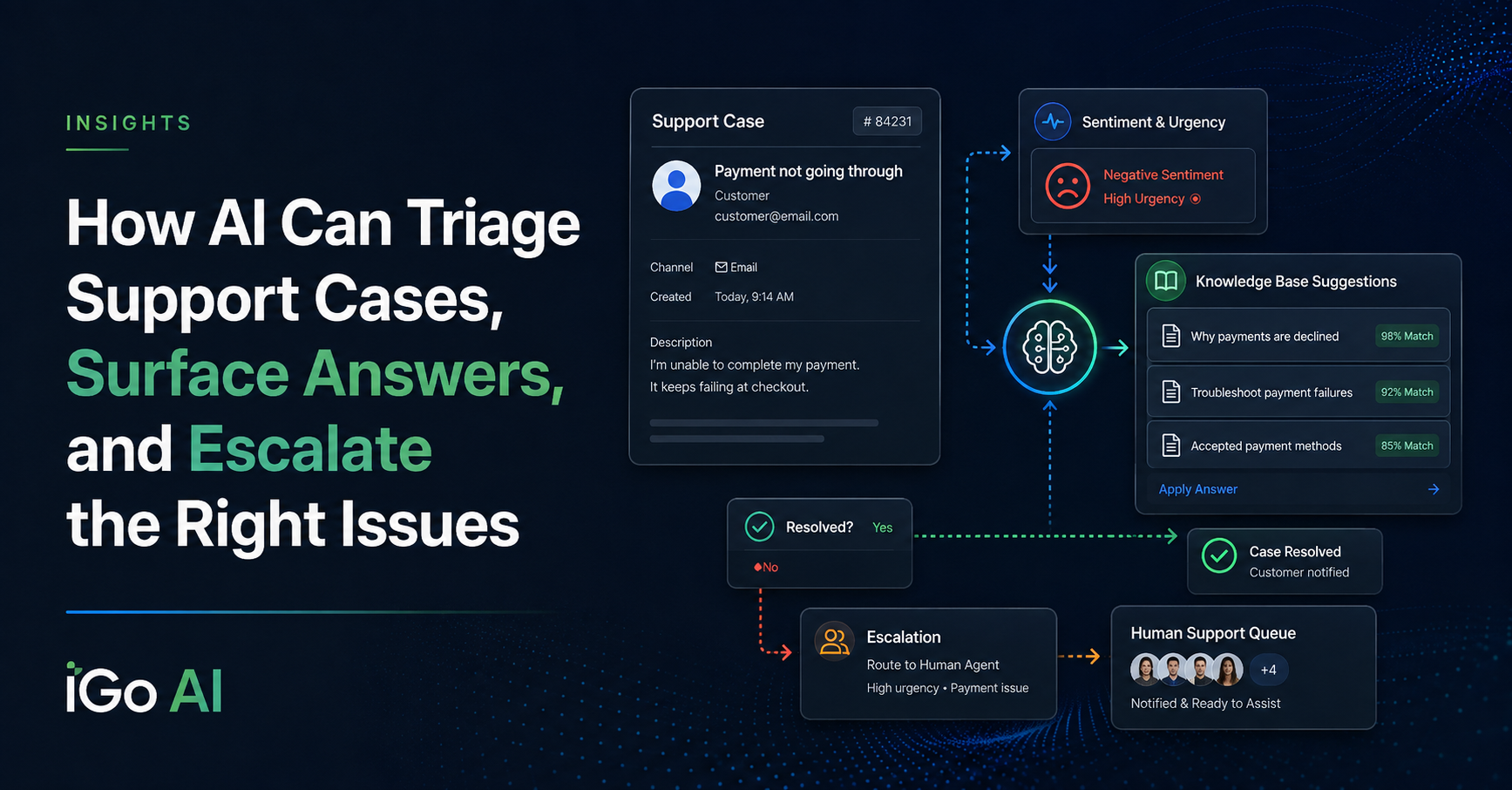
A customer submits a support case.
What happens next?
In many organizations, somebody has to read it, understand what the customer is asking, decide how urgent it is, figure out who should handle it, search for a possible solution, and then respond.
That process works.
But it also means experienced support people spend a lot of time doing first-pass work that is repetitive and, increasingly, something AI can help with.
I recently built a proof-of-concept customer portal that demonstrates a different approach.
Instead of simply recording the case and waiting for a person to review it, AI can begin working on the case immediately.
It can help determine:
- what the customer is asking
- whether the issue appears urgent
- whether the customer seems frustrated or angry
- whether there are existing knowledge-base articles that may help
- whether the case should be escalated
- whether a human needs to get involved immediately
The goal is not to remove people from customer service.
It is to help the support team focus their attention where it matters most.
Not Every Support Case Deserves the Same Response
A customer saying:
I can’t find the setting for this feature.
is very different from:
This is the third time this has happened. Nobody has responded and I need this fixed immediately.
The technical issue may even be similar.
But the customer situation is not.
That matters.
Traditional ticketing systems often rely on the customer selecting a priority, choosing a category, or waiting for a support person to read the case and make that determination.
AI creates another option.
The system can examine the customer’s actual words and use them as another signal for deciding what should happen next.
Using Sentiment and Urgency as an Escalation Signal
In my demonstration, whenever a customer creates a case or posts a case update, the text can be analyzed by AI.
The AI looks for signals such as:
- anger
- frustration
- urgency
- dissatisfaction
- language suggesting immediate attention is required
If those signals meet a defined confidence threshold, the workflow automatically increases the priority of the case.
In my test environment, I added a priority called:
Escalated
A case that had previously been set to Medium could therefore become Escalated after the customer posted an update such as:
I’m very upset. No one has got back to me on this issue. Please respond immediately.
The customer doesn’t have to know anything changed behind the scenes.
The support team simply sees that the case now requires more attention.
AI sentiment and escalation settings
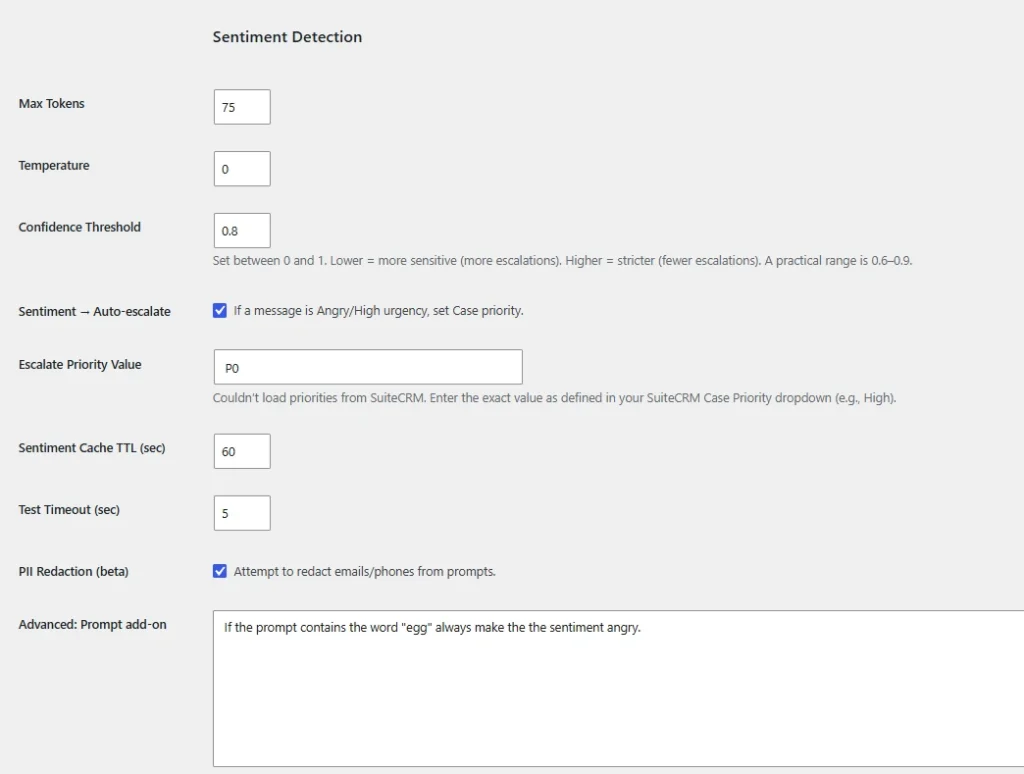
Configurable sentiment and urgency thresholds determine when a case should receive higher priority.
CRM case automatically escalated after customer update
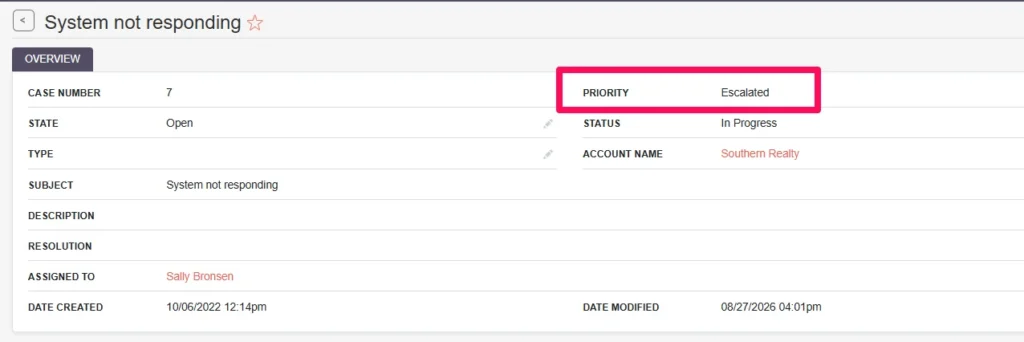
The case priority is automatically increased when the customer’s update crosses the configured escalation threshold.
AI Should Be a Signal, Not an Absolute Truth
This kind of automation needs some restraint.
Sentiment is not perfect.
A customer may use strong language without actually requiring urgent escalation.
Another customer may calmly describe a genuinely critical problem.
That is why I designed the system with configurable confidence thresholds.
Set the threshold too low and almost everything looks urgent.
Set it too high and the workflow may never escalate anything.
The right setting depends on the business, the customers, the type of cases being handled, and what happens operationally after something gets escalated.
That is an important principle for AI implementation generally:
AI should support the workflow. The workflow still needs business rules.
The Next Opportunity: Use the Knowledge Base Before Creating More Work
Escalation solves one side of the problem.
But there is another question:
Can we solve some cases before a support person needs to touch them at all?
Many companies already have a knowledge base containing answers to common questions.
The problem is that customers often don’t search it.
Or they search using different terminology than the article uses.
So they submit a case instead.
Now a support person has to:
- read the case
- recognize the problem
- find the relevant article
- send the customer the link
If the answer already exists, that is a very good candidate for automation.
Using AI for Case Deflection
In the workflow I built, when a new case is created, AI can use the contents of that case to identify relevant knowledge-base articles.
The customer might submit:
I’m not sure how to configure the OpenAI settings in my plugin.
The portal can then automatically respond with several potentially relevant knowledge-base articles.
The customer gets something useful immediately.
If one of those articles solves the problem, no support person needs to become involved.
That is generally called case deflection.
But I think the more useful way to look at it is simply:
Give the customer the most likely answer as early as possible.
AI-suggested knowledge-base articles
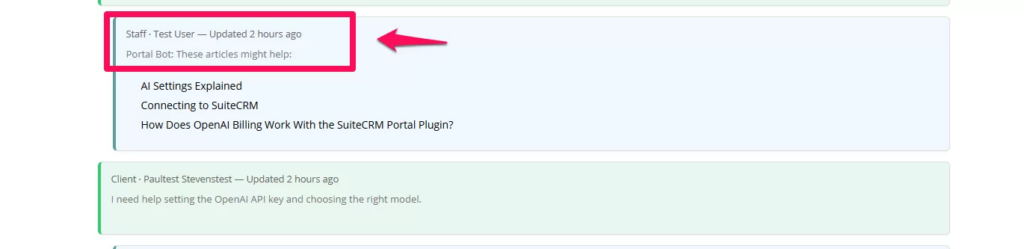
The portal surfaces relevant approved knowledge-base articles based on the customer’s support request.
Case Deflection Shouldn’t Become Customer Annoyance
Automation can create new problems when it is implemented without thinking about the customer experience.
Imagine submitting a support case.
The bot recommends three articles.
You reply that they did not solve the problem.
The bot recommends the same articles again.
You reply again.
The bot sends more knowledge-base links.
At that point, the automation isn’t reducing frustration.
It is creating it.
So I added a configurable cooldown period.
Once the system has suggested knowledge-base content, it will not keep doing so with every subsequent update.
For example, a company might configure the system so another automated knowledge suggestion cannot occur for four or seven days.
That is a small feature technically.
But it represents something much more important operationally:
Automation needs to understand when to stop.
knowledge-base suggestion cooldown settings
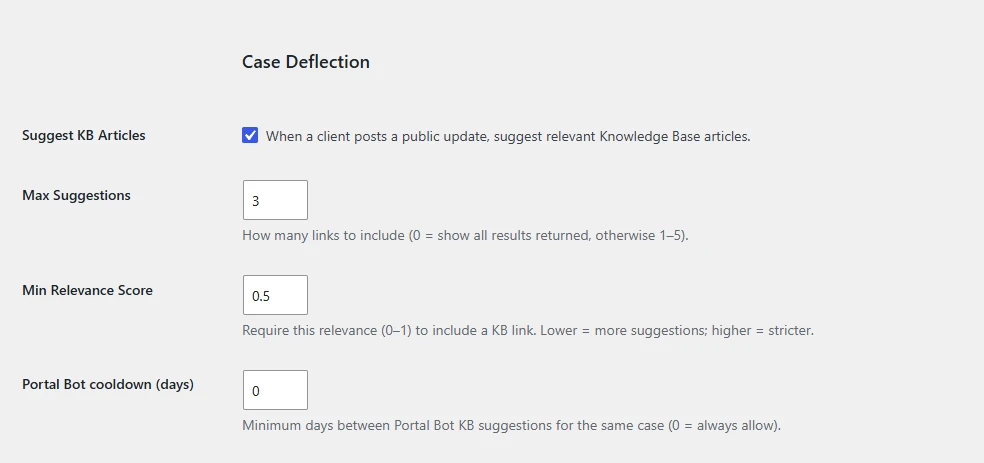
A configurable cooldown prevents the system from repeatedly sending automated article suggestions during the same support conversation.
Level 1 Support Is a Natural AI Opportunity
This creates an interesting model for customer support.
AI can potentially handle some of the repetitive work normally associated with Level 1 support:
Case received → Understand the request → Search approved knowledge → Suggest likely solutions → Evaluate urgency and sentiment → Escalate when necessary
The AI does not have to solve every problem.
It does not have to make every decision.
It simply helps determine:
Is there an obvious answer here?
and:
Does this situation need a person right now?
That alone can make a support process considerably more efficient.
The Knowledge Has to Come From Somewhere
There is another important piece of this.
For knowledge-based support to work well, the business needs useful knowledge.
That could include:
- knowledge-base articles
- product documentation
- procedures
- troubleshooting guides
- policies
- FAQs
- technical documentation
- previous approved solutions
The quality of the AI response is closely tied to the quality and relevance of the information available to it.
That is why I like the approach of surfacing approved knowledge-base content rather than simply asking an AI model to invent an answer to every support question.
For customer-facing support, that distinction can be important.
Relevance Matters More Than Search
My first version of the workflow identifies knowledge-base articles that appear relevant to the customer’s question.
A natural next step is to make that selection even smarter.
For example, the system could retrieve several candidate articles and then use AI to rank them:
Which of these articles actually answers what this customer is asking?
That second evaluation can help reduce situations where the search returns something that happens to contain similar words but does not really solve the problem.
This is an example of how AI workflows can evolve.
You don’t necessarily build the perfect system on day one.
You implement a useful step, observe how it performs, then improve the decision process.
Human Escalation Is Part of the Design
One of the mistakes I see in a lot of AI conversations is the assumption that successful automation means removing the human.
For support workflows, I think that is often the wrong goal.
A better model is:
AI handles routine interpretation and first-line assistance.
People handle exceptions, judgment, relationships, and difficult problems.
A customer who simply needs the correct documentation may never need a support person.
A customer who is angry, describing an unusual situation, or dealing with something business-critical should probably get human attention quickly.
Those are not competing outcomes.
They are two branches of the same workflow.
The Technology Stack Isn’t the Important Part
The proof of concept I built happened to use:
- a WordPress customer portal
- SuiteCRM for case management
- an integrated knowledge base
- OpenAI for AI analysis
But the idea is not specific to those products.
The broader pattern is:
Customer request → AI interpretation → knowledge retrieval → first-line assistance → escalation when needed → support system
That could be implemented around another CRM, help desk, ticketing platform, portal, knowledge system, or AI model.
The important question is not:
Which AI tool should we buy?
It is:
What happens when a customer asks for help, and where is the support team spending time unnecessarily?
AI Can Improve the Process Without Owning the Process
There is a lot of repetitive work surrounding customer support.
Someone has to read every incoming request.
Someone has to determine priority.
Someone has to look for known solutions.
Someone has to notice when a customer is becoming frustrated.
Someone has to decide when something should be escalated.
AI can assist with all of those steps.
But that does not mean handing customer service over to an autonomous bot.
It means building a better process.
Automate the routine. Escalate the exceptions.
That is where I think AI has some of its most practical value in customer service.
See It in Action
In the accompanying video, I demonstrate the customer-service workflow inside a WordPress customer portal connected to a CRM.
The demonstration includes:
- AI sentiment analysis
- automatic case escalation
- configurable escalation confidence
- knowledge-base article suggestions
- case deflection
- configurable cooldown periods to avoid repetitive automated responses
AI Opportunity Assessment
Where Is Your Support Team Spending Its Time?
If your team is repeatedly triaging incoming cases, searching for the same answers, manually changing priorities, or responding to common questions that are already documented, there may be an opportunity to improve the workflow.
The objective does not have to be fully automated customer service.
A much more practical starting point may be:
Let AI handle more of the first pass, and let your people focus on the cases that actually need them.
