
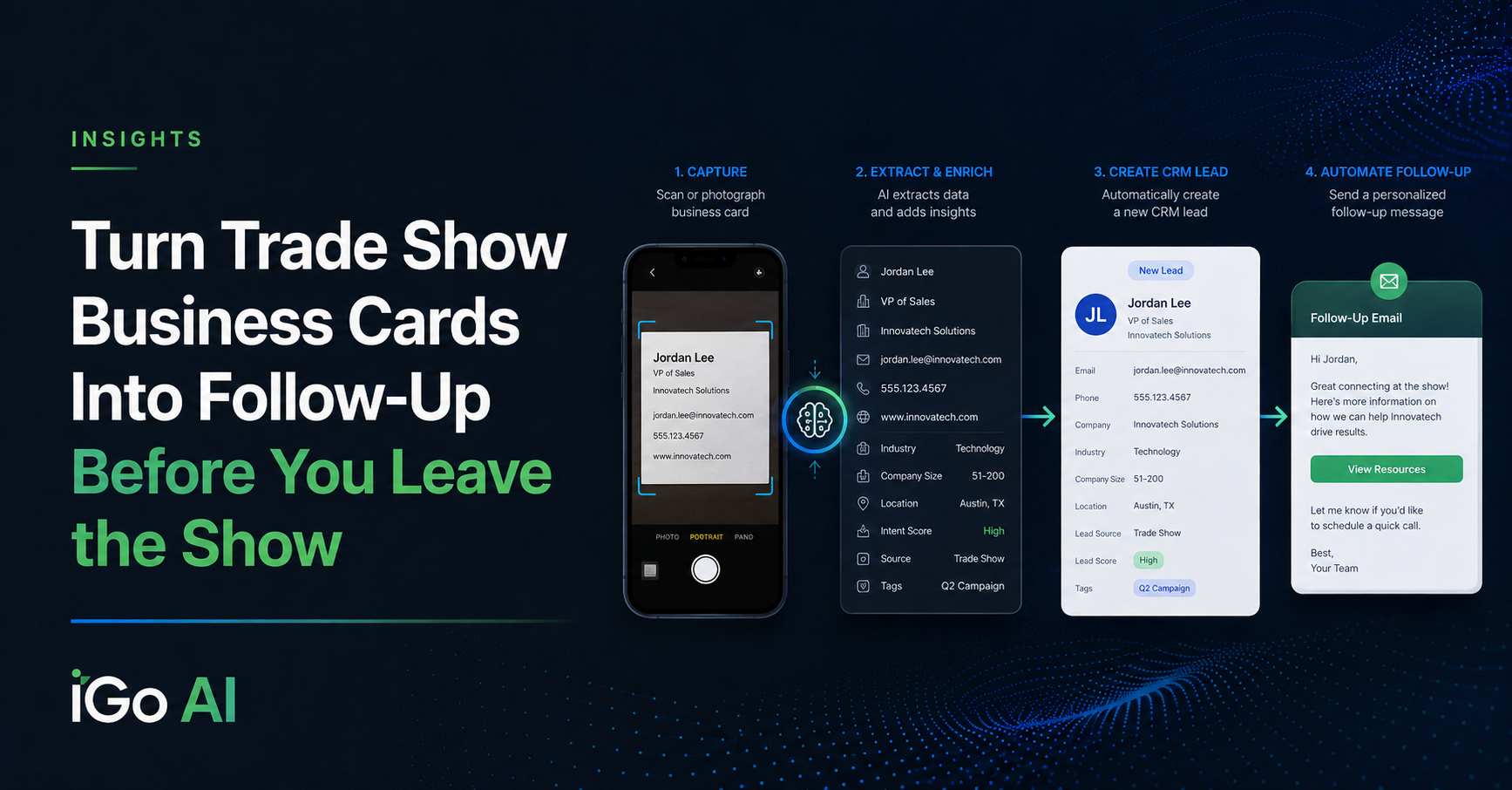
You spend a day at a trade show.
You meet 20 people.
You collect 20 business cards.
Then what happens?
Quite often, those cards sit in a pocket, briefcase, desk drawer, or stack beside somebody’s computer until someone finally has time to enter them into the CRM.
Maybe that happens the next morning.
Maybe next week.
Maybe some of them never make it into the system at all.
And every hour that passes makes the conversation a little less fresh.
This is a simple sales-process problem that AI and automation can now solve surprisingly well.
The Business Card Isn’t Really the Problem
Scanning a business card is useful.
But getting the contact information off the card is only the first step.
What the business really wants is something closer to:
I met somebody → capture the contact → put them in the CRM → understand who they are → follow up appropriately
That’s a workflow.
And once you think about it as a workflow instead of a business-card scanner, considerably more becomes possible.
A Simple Starting Point
I recently built a proof-of-concept workflow around a very straightforward process.
At a trade show or networking event, I can:
- take a picture of a business card with my phone
- email the image to a dedicated email address
- let an automated workflow process it
- use AI to read the card
- extract the contact information
- create a new lead in the CRM
A few seconds later, the contact is in the system.
No typing.
No pile of cards waiting until Monday morning.
No salesperson trying to remember which cards have already been entered.
n8n business card capture workflow
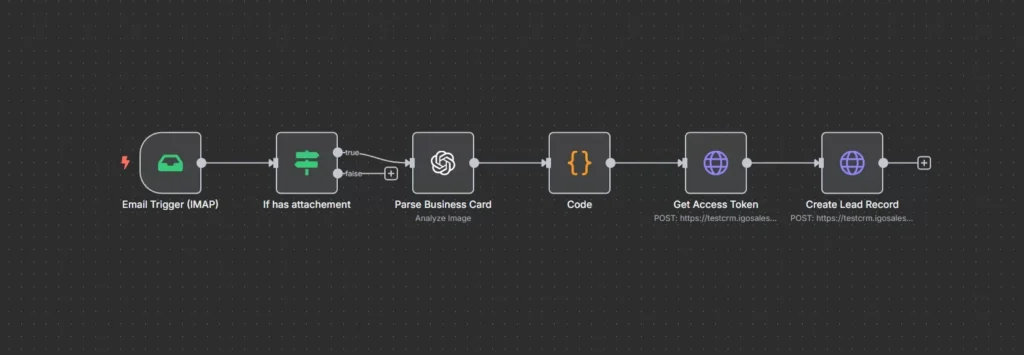
Example workflow receiving the business card image, extracting structured contact data, and creating the CRM lead.
What the AI Is Actually Doing
A photograph of a business card is unstructured information.
The CRM, on the other hand, needs structured data:
- first name
- last name
- company
- title
- phone
- address
- website
- other relevant contact information
The AI receives the card image, interprets what is on it, and returns the useful information in a structured format.
The workflow can then map those values into the corresponding CRM fields and create the lead.
The important part isn’t really the image recognition.
It is what happens next.
business card image / AI data extraction
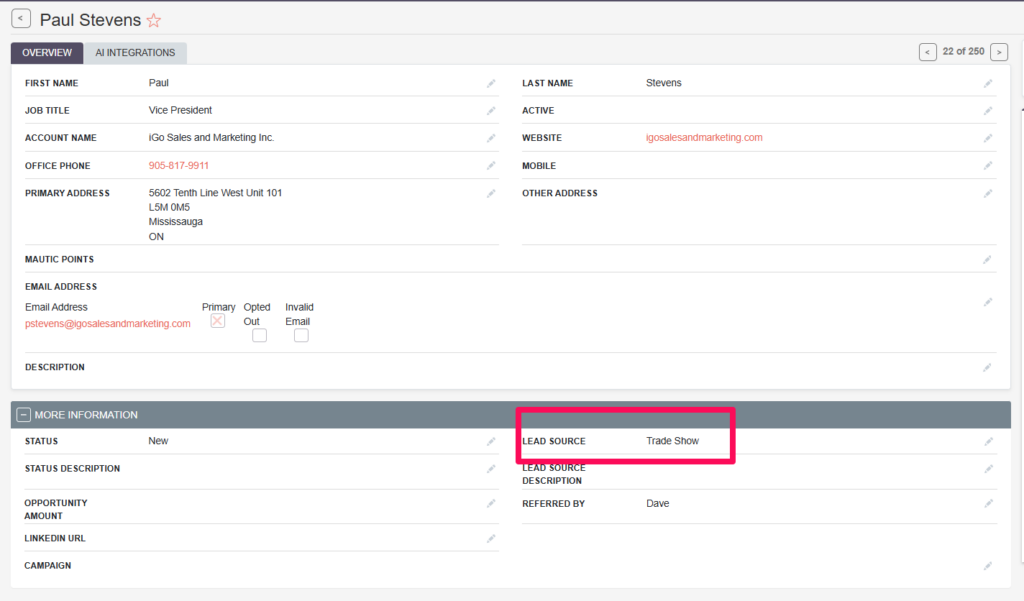
AI interprets the photographed business card and converts the information into structured CRM fields.
Get the Lead Into the System While the Conversation Is Still Fresh
Trade shows can generate a strange sales-process bottleneck.
Companies spend considerable money getting people into a room:
- booth fees
- travel
- hotels
- sponsorships
- salespeople’s time
- marketing materials
Then one of the most important pieces of information produced by that investment — who did we actually meet? — may get processed manually afterward.
Automating the capture step means the lead can enter the sales system almost immediately.
That creates opportunities for the rest of the sales process to begin sooner.
The Workflow Doesn’t Have to Stop at Contact Entry
This is where the idea becomes much more interesting.
Once the lead exists in the CRM, another workflow can start.
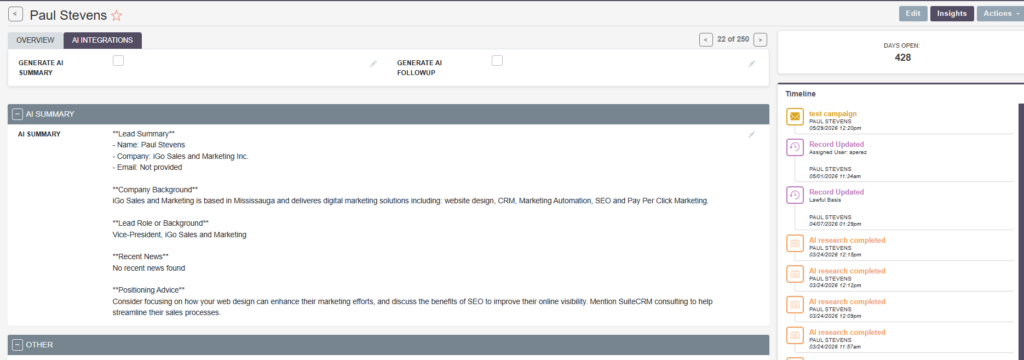
For example, in a previous proof of concept I built an AI research workflow that could take a newly created CRM lead and research:
- the company
- the person’s role
- company background
- relevant news
- potential fit
- positioning considerations
So the complete process can become:
Business card → CRM → company research → AI summary → salesperson
Now the salesperson isn’t returning from a trade show with 30 business cards that need to be entered and researched.
They can return to 30 prepared CRM records.
enriched CRM lead / AI summary
The newly created lead can feed directly into additional AI research and enrichment workflows.
And Then There’s Follow-Up
The next logical step is follow-up.
Imagine meeting someone at a trade show and, once the card has been captured, the system prepares something like:
Great meeting you today. I enjoyed our conversation at the show. Here’s some information about our company and the area we discussed.
That message could incorporate information such as:
- the trade show attended
- which salesperson met the contact
- relevant company information
- product or service discussed
- useful resources
- an appropriate next step
That doesn’t necessarily mean every email should be sent automatically.
Depending on the business, the system might:
Option 1 — Send automatically
Appropriate for a simple, standardized follow-up.
Option 2 — Draft the follow-up
The salesperson receives a prepared email, reviews it, makes any personal adjustments, and sends it.
For many B2B sales environments, I prefer the second approach.
AI handles the repetitive preparation.
The salesperson retains control of the relationship.
Remembering the Conversation Is the Next Opportunity
The business card tells us who the person is.
It doesn’t tell us what we talked about.
That’s an important limitation.
A more advanced version of the process could allow the salesperson to add a quick note when submitting the card:
Met Sarah at Booth 312. They are expanding into Ontario and having trouble managing cross-border shipments. Asked me to send information about our customs capabilities.
Now the workflow has both:
Who the person is
and
Why the conversation mattered
That creates much better input for CRM notes, qualification, research, and follow-up.
It also solves another very common trade-show problem: trying to remember, three days later, what you discussed with each person.
This Could Start With More Than Email
For my demonstration, I used a dedicated email account because it was simple and almost everyone already knows how to send an email from their phone.
But the trigger isn’t particularly important.
The same type of process could potentially start from:
- a mobile form
- text message
- messaging application
- CRM mobile interface
- file upload
- another business application
The right interface depends on the people actually using it.
At a trade show, the best system is probably the one that requires the fewest steps from the salesperson.
The CRM Doesn’t Have to Be SuiteCRM
My demonstration used SuiteCRM because that’s the CRM environment I was working with.
The automation was built with n8n, and AI was used to interpret the business card image.
But those are implementation choices.
The broader architecture is:
Capture → Interpret → Structure → CRM → Enrich → Follow Up
The CRM could be another platform.
The automation technology could change.
The AI model could change.
The important part is designing a process that gets information from the real world into the sales workflow quickly and reliably.
This Is What Practical AI Looks Like
There is nothing particularly futuristic about taking a picture of a business card.
That’s exactly why I like this example.
It takes a very ordinary business process and removes several small pieces of manual work:
- Someone doesn’t have to enter the card.
- Someone doesn’t have to research the company from scratch.
- Someone doesn’t have to remember to create a follow-up task.
- Someone doesn’t necessarily have to write the first follow-up email from a blank screen.
None of those tasks individually represents some enormous breakthrough.
But added together, they create a cleaner sales process.
And that’s often where the real value of AI comes from.
Automate the Administration. Keep the Relationship Human.
The salesperson’s value at the trade show isn’t typing business cards into a CRM.
It’s meeting people.
Having conversations.
Understanding what matters to them.
Recognizing opportunities.
Building relationships.
AI and automation can take care of more of the administrative work surrounding those activities.
That’s the division of labour I find most interesting:
People handle the relationship.
Technology handles more of the repetitive work around it.
See It in Action
In the accompanying video, I demonstrate a proof-of-concept workflow where a salesperson takes a picture of a business card, emails it to a dedicated address, AI extracts the contact information, and the workflow automatically creates the lead inside the CRM.
I also show how that newly created lead can immediately feed into the AI research workflow from my previous demonstration.
AI Opportunity Assessment
What Happens After Your Next Trade Show?
If your sales team comes home from trade shows, conferences, or networking events with stacks of business cards and a manual process waiting for them, there may be a better way to handle it.
The business-card scan is only the beginning.
The bigger opportunity is connecting lead capture, research, CRM, follow-up, and the salesperson into one workflow.
Start with the process. Then automate what makes sense.
